Macswarm vs WarpBuild macOS runners
Macswarm is a cloud Mac for coding agents: a Pod with the Latest Xcode, pre-booted Simulators, Claude Code and Codex that one developer's sessions share, at $99 a month for 300 Pod-hours, with 3 Pod-hours free and no card. WarpBuild is a CI vendor: its macOS runners execute GitHub Actions jobs at $0.08 a minute on a 6 vCPU, 14 GB shape (warpbuild.com, checked 18 November 2026). Pick Macswarm when agents need a Mac to build and tap through an app; pick WarpBuild to run the workflows you already have.
Should you use WarpBuild or Macswarm for macOS?
Use Macswarm when Claude Code or Codex needs a Mac to work on during a session; use WarpBuild when GitHub Actions jobs need a macOS runner. A Macswarm Pod is a macOS virtual machine with the Latest Xcode, three to four pre-booted Simulators, Claude Code, Codex and XcodeBuildMCP. Two to three of one developer’s agents share it, and it is destroyed ten minutes after the last session ends. Pro costs $99 a month for 300 Pod-hours, then $0.40 per extra Pod-hour; Free is 3 Pod-hours once, no card. WarpBuild’s macOS runners take a job from a workflow file through a label such as warp-macos-latest-arm64-6x, run it on 6 vCPU with 14 GB of memory, and bill $0.08 a minute, $4.80 an hour by our arithmetic, with no plan fee listed (warpbuild.com cloud runners and warpbuild.com/pricing, checked 18 November 2026). Macswarm is not a CI runner, and the two can work on the same repository.
Side by side
| Criterion | Macswarm | WarpBuild macOS runners |
|---|---|---|
| What it is | Pods for Claude Code and Codex sessions; not a CI runner | Runners for GitHub Actions jobs, chosen per job with a runner label |
| Price | Free: 3 Pod-hours once. Pro: $99 a month for 300 Pod-hours, then $0.40. Team: $399 for 1,500, then $0.30. Enterprise: from $3,000 a month | $0.08 a minute for 6 vCPU, $0.16 a minute for 12 vCPU; no plan fee listed |
| Billing unit | Pod-hour, metered per second while a Pod runs, including the ten minutes after the last session | Runner minute; the pricing page says CI runners are billed per minute |
| Included usage | 300 Pod-hours on Pro, 1,500 on Team | Free usage or credit limits are mentioned; the amount is not stated |
| What one unit runs | 2 to 3 active agents of one developer, 2 concurrent xcodebuild runs, 3 to 4 Simulators |
A workflow job on a fresh virtual machine, destroyed when the workflow completes |
| Machine | One standard Pod size on a shared Apple silicon Mac mini, two Pods per machine; per-Pod CPU, memory and disk figures are not published | 6 vCPU, 14 GB, 120 GB SSD or 12 vCPU, 28 GB, 270 GB SSD, on M4 Pro and M5 Pro hosts |
| Software | The Latest Xcode, current and previous iOS runtimes, pre-booted Simulators, XcodeBuildMCP, Claude Code, Codex | macOS 14, 15 or 26 images with the same tooling as GitHub-hosted runners; several Xcode releases on the macOS 26 image |
| Concurrency | Pods at a time: 1 on Free, 4 on Pro, 10 on Team | Unlimited on Linux and Windows; for high concurrency on macOS the docs say to contact support |
| Agents | Claude Code through a self-hosted environment or signed in inside the Pod; Codex through the OpenAI Agents API webhook | An MCP server lets an agent switch workflows to WarpBuild; no agent session on a macOS runner is documented |
| Access | Through the agent’s session, logs and screenshots; no SSH | SSH into a running workflow for debugging |
| Free to start | 3 Pod-hours, once, no card | Sign-up without a card; free amount not stated |
| Region | EU (Netherlands) or US, chosen per environment | Region-specific infrastructure on enterprise plans, with a note that it is not applicable to macOS instances |
Source, checked 18 November 2026: WarpBuild runner tags, shapes, images, concurrency and the region note from warpbuild.com cloud runners; prices, billing granularity and sign-up from warpbuild.com/pricing; MCP setup from the warpbuild.com quick start; SSH debugging from warpbuild.com docs. Macswarm prices from the pricing page, limits from Limits and queues.
The machine row is not a hardware comparison. WarpBuild publishes its runner shapes; Macswarm publishes one standard Pod size without per-Pod figures. If your work needs a known 6 or 12 vCPU configuration, WarpBuild’s published shapes are the ones you can plan around.
A session, then a job
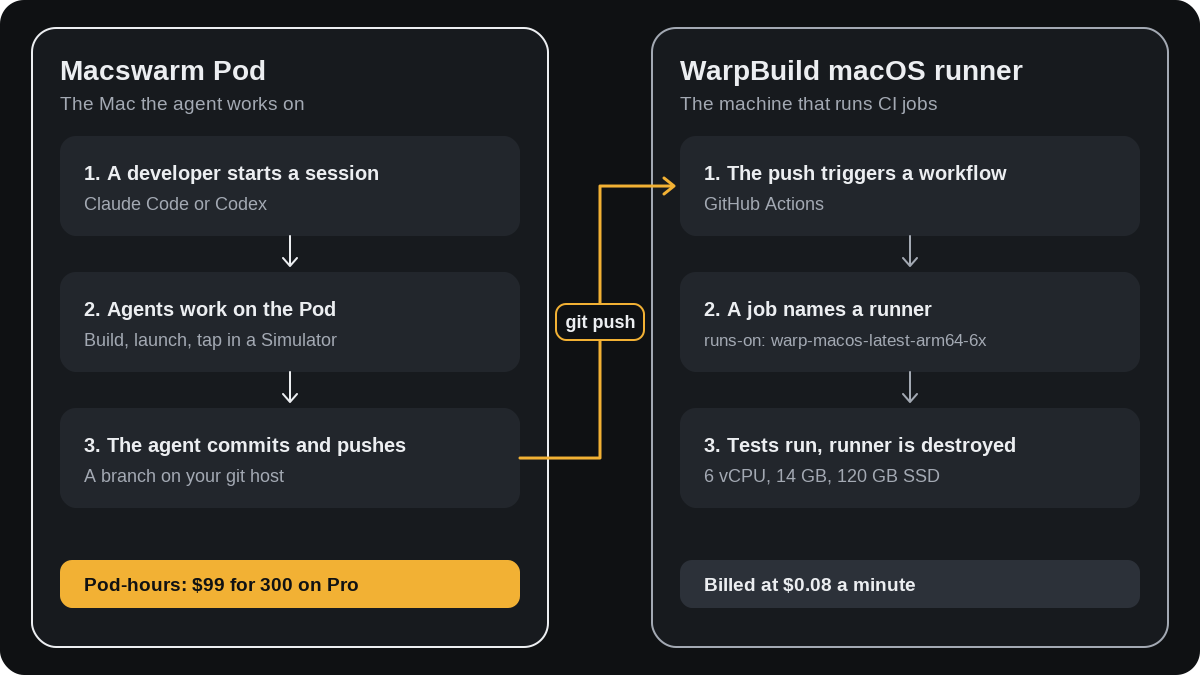
The two products start from different events. A WarpBuild runner starts because a workflow asked for it: a push or a pull request triggers GitHub Actions, the job names a WarpBuild label, the job runs with nobody steering it, and the virtual machine is destroyed when the workflow completes.
A Pod starts because a developer started an agent session. Macswarm hands out a Pod from the warm pool, cloned fresh from a golden image. Your repository is cloned, the agent works in its own git worktree, and further sessions from the same developer join the running Pod. Builds share two xcodebuild slots and Simulators are leased in turn, so two to three active agents fit, and more can queue. Ten minutes after the last session ends the Pod is destroyed, and those ten minutes are billed. Inside a Pod lists what ships in every Pod.
The two meet at the push. The agent commits on the Pod and pushes a branch; your workflow files decide what happens next, and Macswarm needs no change to them.
What do 30, 90 and 300 hours cost?
At list price, Macswarm Pro is $99 for any volume up to 300 Pod-hours in a month, and a WarpBuild 6 vCPU macOS runner is $144 for 30 hours, $432 for 90 and $1,440 for 300 (warpbuild.com/pricing, checked 18 November 2026). The WarpBuild figures are runner minutes at $0.08 with nothing else added: the pricing page lists no plan fee, and it mentions free usage or credit limits without an amount, so this page deducts none. Cache and snapshot charges are excluded. The hours are different things. A runner hour is one job on one runner. A Pod-hour is one Pod running, whatever its agents are doing, including the ten minutes after each last session. These are list-price calculations, not performance figures, and equal hours are not equal work.
| Hours in a month | Macswarm Pro | WarpBuild macOS, 6 vCPU | WarpBuild macOS, 12 vCPU |
|---|---|---|---|
| 10 h (600 minutes) | $99 | $48 | $96 |
| 30 h (1,800 minutes) | $99 | $144 | $288 |
| 90 h (5,400 minutes) | $99 | $432 | $864 |
| 300 h (18,000 minutes) | $99 | $1,440 | $2,880 |
| Hour 301 onward | $0.40 per Pod-hour | $4.80 per runner hour | $9.60 per runner hour |
| What the hour is | One Pod for one developer’s agents | One job on one runner | One job on one runner |
Source, checked 18 November 2026: WarpBuild minutes at $0.08 and $0.16 from warpbuild.com/pricing; totals and hourly figures are our arithmetic, with no free usage deducted. Macswarm prices from the pricing page. Model usage, taxes, cache and snapshot charges are excluded.
Two notes on reading the table.
- WarpBuild’s compute charge is proportional to runtime: twice the minutes, twice the charge. That suits bursty CI, where runners exist only while jobs run. Below about 20 runner hours a month the 6 vCPU charge is under Pro’s flat $99 (20 hours is $96 by our arithmetic; warpbuild.com/pricing, checked 18 November 2026).
- Macswarm Pro is flat until hour 300. At 30 Pod-hours the effective rate is $3.30 a Pod-hour, at 300 it is $0.33; the low rate applies only when the included hours are used (our arithmetic from the pricing page; WarpBuild figures checked 18 November 2026 at warpbuild.com).
Where do agents fit on WarpBuild?
WarpBuild’s quick start describes one use of a coding agent: setup. It offers a path “with your AI agent”, in which Claude Code, Cursor, VS Code or another MCP client connects to a WarpBuild MCP server, installs the GitHub app, changes only runs-on in your workflows and opens a pull request for you to review (warpbuild.com quick start, checked 18 November 2026). In the flow the quick start describes, the agent runs in your own terminal or editor and changes workflow files; the page does not describe giving that agent a Mac to work on.
The pages checked on 18 November 2026 do not document an interactive Claude Code or Codex session on a WarpBuild macOS runner. They do not document running a coding agent inside a workflow job either, so whether that works for your project is a question for WarpBuild. Each runner is a virtual machine created for a workflow and destroyed when it completes; assume no Simulator pool or build queue shared between jobs unless WarpBuild confirms otherwise. The docs do describe SSH into a running workflow for debugging.
For iOS work, Macswarm puts the agent on a Mac. Claude Team or Enterprise organizations connect through a Claude self-hosted environment, Claude Pro or Max users sign in to Claude Code inside a Pod, and Codex connects through the OpenAI Agents API webhook. Setup is in the Claude Code quickstart and the Codex quickstart.
When WarpBuild is the better choice
- You run GitHub Actions and want macOS jobs on a published shape. WarpBuild documents choosing the runner per job through the
runs-onlabel, with the same tooling as GitHub-hosted runners. - Your macOS usage is small or bursty. Ten hours of 6 vCPU jobs in a month come to $48 with no plan fee listed (warpbuild.com/pricing, checked 18 November 2026). That is below Macswarm Pro’s flat $99, and Macswarm could not run those jobs anyway.
- You need macOS 14 or 15 images, or more than one Xcode release on the same runner. A Pod carries only the Latest Xcode.
- You need a 12 vCPU, 28 GB runner for heavy builds. Macswarm has one standard Pod size and publishes no per-Pod figures.
- You want to SSH into a failing job. A Pod has no SSH and no screen sharing; you watch agents through their sessions, logs and screenshots.
- You already use WarpBuild for Linux or Windows runners, Docker builders or its cache, and want macOS on the same bill.
- You need a compliance report today. WarpBuild’s pages state SOC2 Type 2 compliance with a trust center; Macswarm holds no SOC 2 report, as Security says.
When Macswarm is the better choice
- Claude Code or Codex has to build, launch and tap through an iOS app, and you want a Mac with the agents, the Latest Xcode and XcodeBuildMCP already on it, with no machine to maintain.
- One developer runs several agents at once. They share one Pod and one meter, with two build slots and three to four Simulators leased in turn.
- Several developers would otherwise each need a Mac for agent work. Pro’s 300 Pod-hours and four Pods at a time are shared across the team, with no seats.
- Your agent hours are long. Past about 20 hours a month, Pro’s flat $99 is below the 6 vCPU runner charge at $0.08 a minute, and it stays $99 up to 300 Pod-hours (warpbuild.com/pricing, checked 18 November 2026; a Pod-hour and a runner hour are different units).
- You want the EU (Netherlands) or the US chosen per environment. WarpBuild’s region-specific infrastructure is an enterprise feature that its docs mark as not applicable to macOS instances.
- You want a monthly spend cap rather than an open per-minute meter.
Is there a free way to try each?
Yes, both. Macswarm Free gives 3 Pod-hours once, with one Pod at a time and no card. When the hours run out, sessions stop and the dashboard asks you to pick a plan; nothing is charged until you do. WarpBuild’s pricing page says you can sign up with an email and no credit card, and that you add a payment method when you reach the free usage or credit limits (warpbuild.com/pricing, checked 18 November 2026). The page does not state how much free usage or credit a new account gets. It lists cache storage and snapshots as separately priced add-ons.
WarpBuild limits worth knowing
These come from WarpBuild’s own pages, checked 18 November 2026, and matter when you size a macOS pipeline.
- The docs say macOS runners do not support nested virtualization and cannot run Docker.
- Unlimited concurrency is stated for Linux and Windows runners. For macOS, the docs say to contact support if you need high concurrency.
- The quick start says WarpBuild needs a GitHub organization and cannot be installed on a personal account.
- From 1 October 2026 the 6 vCPU macOS runner has 14 GB of memory and the 12 vCPU runner 28 GB, at unchanged prices; macOS 13 runners were removed on 8 June 2026.
- Billing happens on the last day of each month, and the payment method may be charged mid-cycle once an account threshold is crossed.
- WarpBuild says its macOS runner is “up to 3x faster” than GitHub’s
macos-latest-xlargeand 22% cheaper per minute. That is the vendor’s stated result; this page has no measurement of it.
Macswarm’s limits are in Limits and queues: two to three active agents and two build slots per Pod, an 8-hour longest session, nothing kept on the Pod between sessions, and no uptime commitment on Free, Pro and Team.
Related
- GitHub Actions macOS runner alternatives and prices: every runner vendor in one dated table.
- Macswarm vs Depot macOS runners: the same question for Depot, which adds a monthly plan fee.
- Macswarm vs GitHub-hosted macOS runners: GitHub’s own per-minute runners, or Pod-hours.
- Cirrus Runners alternatives: where to move CI jobs after Cirrus Runners.
Sources
- WarpBuild macOS runner tags, shapes, hosts, images, concurrency, Docker and virtualization notes, the region note and the speed claim: warpbuild.com docs, Cloud Runners, checked 18 November 2026.
- WarpBuild per-minute prices, add-ons, billing granularity, billing date, sign-up without a card and the compliance statement: warpbuild.com/pricing, checked 18 November 2026.
- WarpBuild MCP setup, the GitHub app and the organization requirement: warpbuild.com docs, Quick Start, checked 18 November 2026.
- WarpBuild features, SSH debugging and virtual machine isolation: warpbuild.com docs, What is WarpBuild?, checked 18 November 2026.
- Macswarm prices and limits: the pricing page, Limits and queues, Inside a Pod and Security. Hourly figures, monthly totals and effective rates are our arithmetic from the list prices.