Claude Code Remote Control or a Macswarm Pod for iOS?
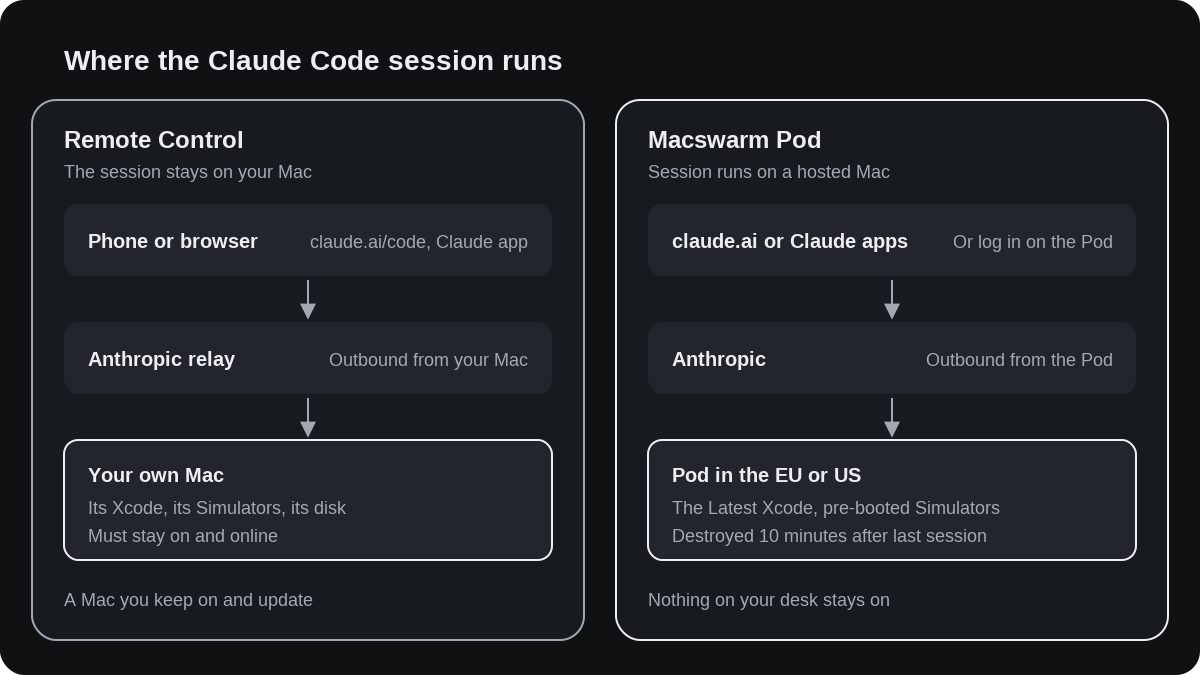
Claude Code Remote Control is Anthropic's way to steer a Claude Code session that runs on your own Mac from a phone or a browser. A Macswarm Pod is a hosted Mac with the Latest Xcode, pre-booted Simulators, Claude Code and Codex, which the session runs on instead. Remote Control fits one developer whose Mac stays on. A Pod fits sessions that start and stop, developers without a spare Mac, and teams where each developer would otherwise keep their own Mac awake.
Remote Control or a Pod: which should run Claude?
Choose by where the session should run. Remote Control keeps the Claude Code session on a Mac you own and lets you follow it from a phone or a browser; a Macswarm Pod is a hosted Mac the session runs on, so nothing on your desk has to stay on. Anthropic’s Remote Control page says sessions “run directly on your machine and interact with your local filesystem”, and that the computer has to stay on and the claude process has to keep running. That is the right trade for one developer with a Mac that never sleeps. It is the wrong one when sessions start at odd hours from a laptop that closes, when three developers would each keep their own Mac awake, or when a cloud session, such as a scheduled task that runs while every laptop is closed, has to execute on a Mac. A Pod boots with the Latest Xcode, current and previous iOS runtimes, three to four pre-booted Simulators, Claude Code and Codex. It is billed per Pod-hour and destroyed ten minutes after the last session ends.
Start free with 3 Pod-hours, no card
Starting from claude.ai alone does not call for a Pod: a Remote Control server that is already running takes sessions you start from claude.ai/code or the Claude app, and they use the local Mac’s Xcode and Simulators. The condition is that the Mac is on.
What does Remote Control require?
All of the following is from Anthropic’s Remote Control documentation, checked 23 November 2026.
- A Claude subscription, not an API key. Remote Control is available on Pro, Max, Ultra, Team and Enterprise plans; “API keys are not supported”. You sign in with
/loginthrough claude.ai. - An Owner’s toggle on Team and Enterprise. It is off by default on those plans until an Owner enables it in Claude Code admin settings. Organizations with Zero Data Retention or the HIPAA configuration cannot enable it, and it does not work through Amazon Bedrock, Google Cloud or Microsoft Foundry.
- A machine that stays on. The
claudeprocess runs on your Mac, so the Mac has to stay on; closing the terminal or quitting the app takes the session offline. After a sleep or a network drop Claude Code reconnects when the machine comes back online, with one documented exception: in server mode it gives up after roughly 10 minutes without network and theclaude remote-controlprocess exits until you restart it. An interactive session keeps working locally and keeps retrying. - Server mode for more than one session. Outside server mode, each Claude Code instance supports one remote session at a time.
Server mode is one command. --spawn worktree gives each session its own git worktree, and --capacity sets the most concurrent sessions, 32 by default:
claude remote-control --spawn worktree --capacity 4The session then has the Mac’s own Xcode, Simulators and disk. While it is connected, Anthropic stores the session transcript on its servers.
What does a Pod require?
A Pod needs a Macswarm account and a way for Claude Code to reach it. There are two, both documented in the Claude Code quickstart:
- Claude Team or Enterprise: an Owner turns on Anthropic’s self-hosted environments, which “execute Claude Code cloud sessions on infrastructure your organization operates” (Anthropic, checked 23 November 2026). Sessions then start from claude.ai/code, the desktop and mobile apps, cloud scheduled tasks or
claude --cloud, and run on a Pod. Claude Code self-hosted environments on macOS explains the architecture. - Claude Pro or Max: start a Pod on the Free or Pro plan and sign in to Claude Code inside it with your own account.
Codex connects to the same Pod through the OpenAI Agents API webhook. A Pod makes outbound connections only, has no SSH, and keeps nothing between sessions: the next session starts from a fresh clone, so the agent commits and pushes before it ends. Inside a Pod lists everything a Pod ships with, and Security the isolation model.
How do they compare side by side?
| Criterion | Macswarm Pod | Remote Control on your Mac |
|---|---|---|
| Where the session runs | A hosted macOS VM in the EU (Netherlands) or the US | Your own Mac |
| What must stay on | Nothing on your side | Your Mac and the claude process |
| Claude plan | Team or Enterprise via a self-hosted environment; Pro or Max by signing in inside the Pod | Pro, Max, Ultra, Team or Enterprise; no API keys |
| Xcode and Simulators | The Latest Xcode, current and previous iOS runtimes, 3 to 4 pre-booted Simulators | Whatever you installed and keep updated |
| Parallel sessions | 2 to 3 active agents per Pod, 2 build slots; Pods at a time: Free 1, Pro 4, Team 10 | 32 sessions by default in server mode; real limit is the Mac |
| Codex | Installed, connects through the Agents API webhook | Not part of Remote Control |
| Physical iPhone on USB | Not documented; write to info@macswarm.com | Possible on your own Mac |
| State between sessions | None; fresh clone each time | Your disk persists |
| Cost | Free 3 Pod-hours once; Pro $99 for 300, then $0.40; Team $399 for 1,500, then $0.30 | Your Claude plan plus a Mac you own and power |
Source, checked 23 November 2026: code.claude.com; Macswarm prices from the pricing page.
The per-Pod numbers come from Limits and queues. Per-Pod CPU, memory and disk figures are not published; each Mac mini runs two Pods.
Should Claude Code run on a Mac mini 24/7?
If one developer needs a Mac for a year or more and runs work around the clock, a Mac mini with Remote Control in server mode is a sound setup. It brings root access, a persistent disk, a physical iPhone on USB and no hosting fee beyond the hardware and power. What it costs is upkeep: the Mac must stay awake and online, someone updates macOS, Xcode and the iOS runtimes, and a power cut or a fault stops every session on it until someone gets to it. Mac mini vs Macswarm Pods prices the purchase and walks through keeping one reachable.
Anthropic also documents cloud scheduled tasks that “keep running even when your computer is off” (Claude Code overview, checked 23 November 2026). By default those cloud sessions run on Anthropic’s infrastructure, and Anthropic’s Simulator page says that in cloud sessions Claude “runs on a machine that can’t reach the simulators on your Mac” (Anthropic, checked 23 November 2026). Routed to a self-hosted environment on Macswarm, the same scheduled task runs on a Pod with the Latest Xcode and pre-booted Simulators.
What does each cost a team?
Remote Control adds no charge of its own beyond the Claude plan; the cost is the Mac. For one developer who already has one, that is close to zero, and Remote Control wins on price.
For a team, count Macs. This comparison assumes each developer runs Remote Control on their own Mac, the usual setup when every developer works on a laptop or desktop of their own; Anthropic’s page does not require one Mac per developer. The pricing page works one developer at four hours of Pod runtime a day for 22 days, about 90 Pod-hours a month. On that assumption, Pro’s 300 Pod-hours at $99 a month cover about three developers, roughly a third of $99 each, with up to four Pods running at once. Team’s 1,500 Pod-hours at $399 cover about fifteen developers’ hours with up to ten Pods at once. This is an inference from the published example, not a measurement of your usage; heavier use costs $0.40 per extra Pod-hour on Pro and $0.30 on Team. Pro and Team can set a monthly spend cap.
Model usage is billed by Anthropic in both cases. Macswarm bills Pod-hours only, per second, including the ten idle minutes after the last session.
When Remote Control is the better choice
- You own a Mac that stays on, you are one developer, and you run one or a few sessions at a time.
- You need a physical iPhone or iPad on USB, root access or files that persist between sessions. Your own Mac has all three. A Pod keeps no files between sessions and has no SSH; physical devices and root are not documented for Pods, so write to info@macswarm.com before you count on them.
- Your organization uses Claude Code through Amazon Bedrock or Google Cloud and cannot use claude.ai sessions. Remote Control does not work there either, so a local session is the remaining route.
- You run work around the clock on one machine for a long time; at constant use a Mac you own costs less than metered Pod-hours.
What else do people ask?
Does Remote Control work while my Mac sleeps?
No. Anthropic’s Remote Control page says the session runs directly on your machine, and that the computer has to stay on and the claude process has to keep running, so a sleeping Mac runs nothing. A network drop is different: an interactive session keeps working locally and reconnects, while a server-mode process gives up after roughly 10 minutes offline and has to be restarted. A Pod runs in a Macswarm data center in the EU or the US, so a closed laptop does not stop the session.
Can I use Remote Control with an API key?
No. Anthropic lists Remote Control on Pro, Max, Ultra, Team and Enterprise plans and states that API keys are not supported. It is also unavailable through Amazon Bedrock, Google Cloud and Microsoft Foundry, and for organizations with Zero Data Retention or the HIPAA configuration. On Team and Enterprise an Owner turns it on first. A Claude Pro or Max user can instead sign in to Claude Code inside a Macswarm Pod with their own account.
How many sessions can one Remote Control Mac run?
In server mode, started with claude remote-control, Anthropic documents a capacity flag whose default is 32 concurrent sessions, and a worktree spawn mode that gives each session its own git worktree. Outside server mode each Claude Code instance serves one remote session. The practical limit is the Mac: its CPU, memory and how many Xcode builds it can run at once. A Pod is sized for two to three active agents with two build slots and three to four Simulators.
Can Remote Control use the iOS Simulator?
The session runs on your Mac, so it uses that Mac’s Xcode and Simulators, with whatever versions you installed. Anthropic’s Simulator pane in Claude Code Desktop is documented for local sessions only, and Claude drives simulated devices, not a physical iPhone. Every Macswarm Pod ships with the Latest Xcode, current and previous iOS runtimes and three to four pre-booted Simulators, so nothing has to be installed before a session starts.
Is a Pod cheaper than a Mac mini?
For one developer who already owns a Mac that stays on, no: Remote Control adds no hosting charge beyond the Claude plan. A Pod costs Pod-hours: Pro is $99 a month for 300 Pod-hours, then $0.40 each. The case for a Pod is a team: on the pricing page’s assumption of about 90 Pod-hours per developer a month, Pro covers about three developers, compared with three developers each keeping their own Mac on, which is the assumption here. Mac mini vs Macswarm Pods prices the hardware.
A Pod is the better choice when the session should not depend on a laptop being open, when nobody on the team has a Mac to spare, or when several developers each need a Mac with the Latest Xcode ready in minutes. Questions the docs do not answer go to info@macswarm.com.