fastlane on a Macswarm Pod: what an agent can run
fastlane is an open-source tool that runs iOS build, test, screenshot, signing and release steps as named lanes. On a Macswarm Pod, Claude Code and Codex can run the lanes that need no Apple secrets, such as tests on pre-booted Simulators, App Store screenshots and unsigned builds, on a Mac that starts with the Latest Xcode and Ruby installed. Signing with match and uploads to App Store Connect need credentials and network access the Macswarm docs do not describe. This page says what works and what to ask.
Can an agent run fastlane on a Pod?
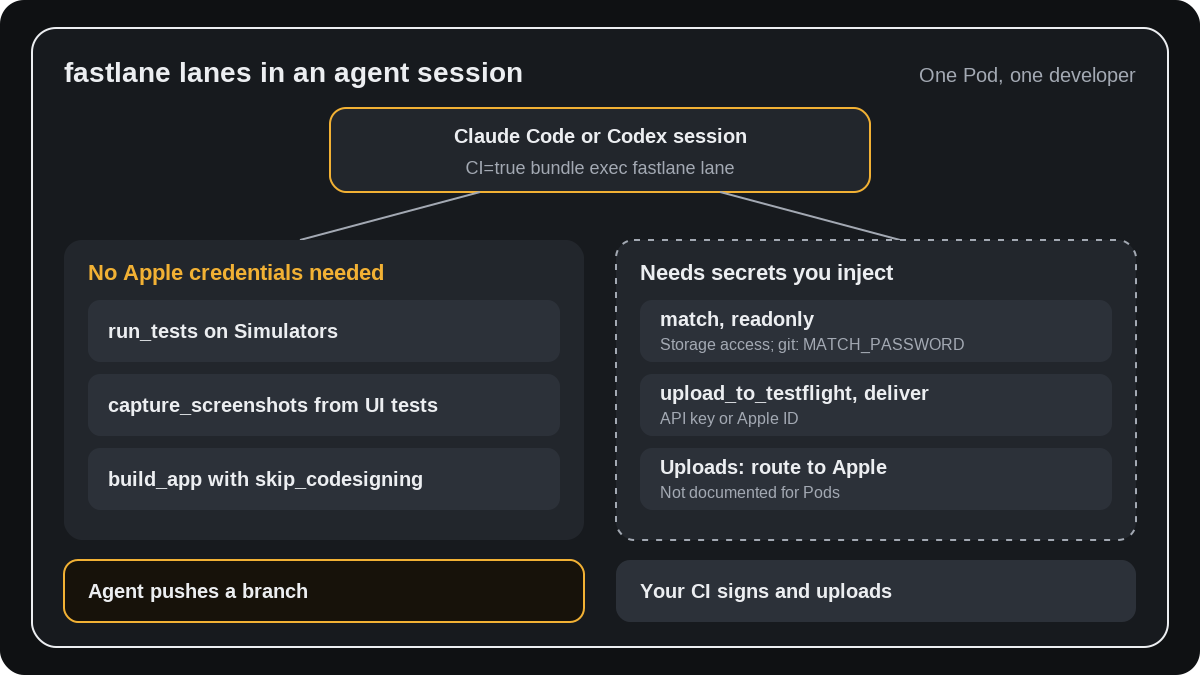
Yes, for lanes that stay inside the Mac. A Macswarm Pod is a macOS virtual machine with the Latest Xcode, current and previous iOS runtimes, three to four pre-booted Simulators, Claude Code, Codex, git, and Ruby for fastlane and CocoaPods. An agent in a session can install your pinned fastlane with Bundler, then run run_tests against the Simulators, capture_screenshots from your UI tests and build_app with code signing skipped, and push a branch with the results. Those lanes need no Apple account. Lanes that sign or upload need more. match in readonly mode fetches existing certificates from the storage you configured, so it needs that storage’s credentials, plus MATCH_PASSWORD for git storage. upload_to_testflight and deliver need an App Store Connect API key or an Apple ID, and a connection to Apple’s servers. Macswarm documents that build secrets are injected at session start and destroyed with the Pod, but not how certificates are stored or whether Apple’s servers are reachable, so treat signing and upload on a Pod as not documented and keep them in your CI until Macswarm confirms otherwise at info@macswarm.com.
The free plan is 3 Pod-hours once, with no card. Whether a test lane and a screenshot lane both fit depends on how long your project’s runs take. Product facts on this page come from Inside a Pod, Limits and queues and Security. fastlane facts come from its documentation, read on 21 November 2026. Nothing on this page was run on a Pod by the authors; the Fastfile below is an example to adapt.
Which lanes work without Apple credentials?
fastlane is “officially supported to run on macOS”, in its own words, and a Pod is a Mac. The split that matters for an agent is whether a lane talks to Apple. A lane that only drives Xcode and the Simulator runs on a fresh Pod with nothing but your repository. A lane that touches the Developer Portal or App Store Connect needs a login, and on a Pod that means secrets you inject for the session.
| Action | What it does | Apple credentials | On a Macswarm Pod |
|---|---|---|---|
run_tests (scan) |
Runs unit and UI tests on named Simulators, writes HTML and JUnit reports | None | Runs on the pre-booted Simulators; builds share the Pod’s two xcodebuild slots |
capture_screenshots (snapshot) |
Runs UI tests per device and language and saves the screenshots | None | Runs; screenshots stay in the Pod until the agent commits or attaches them |
build_app with skip_codesigning |
Builds the app without signing | None | Runs; useful as a compile check before a pull request |
match with readonly: true |
Fetches existing certificates and profiles, installs them in a keychain | Read access to match storage; MATCH_PASSWORD for git storage |
Not documented; certificate and keychain handling on Pods is not described |
upload_to_testflight, deliver |
Uploads a build or metadata to App Store Connect | App Store Connect API key or Apple ID, and a connection to Apple | Not documented; Apple’s servers are not on the published outbound list |
Source, checked 21 November 2026: docs.fastlane.tools (run_tests, snapshot, build_app, match, App Store Connect API pages); Macswarm facts from Inside a Pod and Security.
Set up fastlane for an agent session
These steps follow fastlane’s own setup guide. Run them once on your machine to create the files, commit them, and the agent repeats only steps 4 to 6 in each session, because a Pod starts from a fresh clone every time.
-
Pin fastlane in a
Gemfileat the repository root, as fastlane recommends. On your machine, install Bundler and runbundle updateto generateGemfile.lock, then commit both files.source "https://rubygems.org" gem "fastlane"gem install bundler bundle update -
For the screenshot lane, set up snapshot as fastlane’s screenshot guide describes: run
bundle exec fastlane snapshot init, add the generatedSnapshotHelper.swiftto your UI test target, share the UI test scheme, callsetupSnapshot(app)beforeapp.launch()andsnapshot("01LoginScreen")where you want each screenshot, and commit theSnapfilewith the devices and languages you need. Plain UI tests without these calls produce no snapshot output. -
Write lanes that need no Apple login and take every parameter from the Fastfile, so nothing prompts. This is an example; replace the scheme, devices and languages with your own.
# fastlane/Fastfile (example) default_platform(:ios) platform :ios do lane :test do run_tests( scheme: "MyApp", devices: ["iPhone 16"], output_types: "html,junit", result_bundle: true ) end lane :screenshots do capture_screenshots(scheme: "MyAppUITests") end lane :compile do build_app(scheme: "MyApp", skip_codesigning: true, skip_archive: true) end end -
In the session, check Ruby and install the pinned gems. fastlane supports Ruby 3.2 or newer and prefers 3.3; the Macswarm docs do not publish the Pod’s Ruby version, so the first command tells you.
ruby --version gem install bundler bundle install -
Set a UTF-8 locale, which fastlane’s setup guide asks for, and
CI=true. fastlane’s CI guide says that withCI=trueit stops with an error that names the missing option instead of waiting for an answer, and names AI agents and scripts as the case for it.export LC_ALL=en_US.UTF-8 export LANG=en_US.UTF-8 export CI=true -
Run a lane.
bundle exec fastlane test
bundle exec fastlane screenshots
Tell the agent which lanes it may run. A short block in CLAUDE.md for Claude Code or AGENTS.md for Codex works: “Run bundle exec fastlane test before every push. Never run lanes that call match, pilot or deliver.” The Claude Code quickstart and the Codex quickstart cover connecting each agent to a Pod. For getting the screenshots in front of a reviewer, see iOS Simulator screenshots in pull requests.
What do signing and App Store Connect need?
fastlane’s answer to signing on a machine you do not keep is match. It “creates all required certificates & provisioning profiles and stores them in a separate git repository, Google Cloud, or Amazon S3”, encrypts the git copy with a passphrase, and installs the certificates in a keychain on each run. On CI, fastlane recommends running match in readonly mode so it never creates new certificates, and, for git storage, setting the passphrase as the secret environment variable MATCH_PASSWORD; Google Cloud and Amazon S3 storage take their own credentials instead. Readonly match needs no Developer Portal access, in fastlane’s words, because it only fetches what is already stored. The setup_ci action creates a temporary keychain for match and switches it to readonly. Access to a git-backed match repository is the part fastlane calls tricky: the machine needs a key or token for a second repository besides your code.
For App Store Connect, fastlane recommends an API key over an Apple ID: no two-factor prompt, a documented API, better reliability. A key is three values: the key ID, the issuer ID and the .p8 file, which Apple lets you download only once. upload_to_testflight and deliver read them from the app_store_connect_api_key action or from a JSON file passed as api_key_path.
What Macswarm documents that bears on this:
- Build secrets are added per environment in the dashboard, injected at session start, and exist only in that Pod’s memory and session-scoped files. They are destroyed with the Pod (Security).
- Nothing persists between sessions, not caches and not credentials. Anything match installs is gone ten minutes after the last session ends, so each session would fetch again in
readonlymode. - Pods connect out to Anthropic or OpenAI, your git host and the package registries a build needs. A match repository on the same git host fits that list; Google Cloud Storage, Amazon S3 and Apple’s servers are not on it.
What the Macswarm docs do not document
Name these as open questions before you plan a release flow around a Pod. For each, write to info@macswarm.com.
- How injected secrets appear in the session: as environment variables, as files, or both.
MATCH_PASSWORDand an API key JSON need one or the other. - How certificates and keychains are handled on a Pod, and whether
setup_ci’s temporary keychain works there. - Whether a Pod can reach App Store Connect and the Apple Developer Portal.
- Which Ruby and fastlane versions the image carries.
- Whether Simulators a lane boots by device name go through the Pod’s Simulator lease or count against its pool.
Until those are answered, the documented split is the one the rest of the site describes: the agent builds, tests and takes screenshots on the Pod and pushes a branch; your pipeline signs and ships it. Pods also run no physical devices, so lanes that install on an iPhone or iPad are out of scope.
How do Pod limits affect fastlane lanes?
A fastlane lane is ordinary work inside an agent session, so it shares the Pod’s limits with everything else the agent does. run_tests, capture_screenshots and build_app all call xcodebuild, and a Pod runs two xcodebuild builds at once, scheduled fairly between agents; a third waits for a slot. A Pod keeps three to four Simulators booted, and a screenshot lane over many devices and languages takes as long as those runs take. A session can last 8 hours before the agent is asked to wrap up and push, and the Pod is destroyed ten minutes after the last session ends. Those ten minutes are billed, per second, like the rest of the runtime. On Pro, $99 a month buys 300 Pod-hours, about $0.33 each, and extra hours cost $0.40. Each plan caps Pods at a time: one on Free, four on Pro and ten on Team, as Limits and queues lists.
Keep the device list in the Snapfile and the devices array of run_tests to what the review needs. The Pod ships current iOS and the previous major on the Latest Xcode, so name devices that exist on those runtimes. The pricing page has the plan details.
When a Pod is the wrong place for fastlane
- You want signed builds on TestFlight from every push with no agent involved. That is a CI job. A Pod is not a CI runner: it has no runner registration and no workflow trigger. Use macOS CI or Xcode Cloud; Macswarm vs Xcode Cloud and macOS CI runner pricing compare the options.
- Your lanes install on a physical iPhone or iPad. Pods have Simulators, not devices.
- You need a keychain that persists between runs. Nothing on a Pod outlives the session.
Where a Pod fits is the agent loop before the pipeline: Claude Code or Codex changes code, runs bundle exec fastlane test and the screenshot lane on a Mac that was ready when the session started, and opens a pull request your CI then signs and ships.