My Remote Mac Alternative: Macswarm vs My Remote Mac
My Remote Mac is a rental service for dedicated physical Mac minis and Mac Pros, from $85 a month or $14 a day for a Mac mini M4 (checked 6 November 2026). Macswarm bills Pod-hours for macOS VMs that Claude Code and Codex use during their sessions. For one developer, the rented Mac at $85 costs less than Pro at $99. For three developers whose agents use about 90 Pod-hours each, one Pro plan at $99 costs less than three rented Macs at $255.
Should you rent a My Remote Mac or use Macswarm Pods?
Rent a My Remote Mac when one person needs one Mac that is on all month, with root access and files that stay between sessions; use Macswarm when Claude Code or Codex agents need a Mac only while they work. My Remote Mac rents dedicated physical machines allocated 1:1: a Mac mini M4 with 16 GB of memory and a 256 GB SSD is $85 a month, or $14 for 24 hours on a day plan that renews until you turn it off, with root access over SSH and VNC and dedicated IPv4 and IPv6 addresses (myremotemac.com, checked 6 November 2026). Macswarm bills Pod-hours: Free is 3 Pod-hours once with no card, Pro is $99 a month for 300 Pod-hours with up to four Pods at a time, then $0.40 per extra Pod-hour, and Team is $399 for 1,500, then $0.30. A Pod is a macOS VM with the Latest Xcode, pre-booted Simulators, Claude Code and Codex, shared by one developer’s agents, with no SSH, destroyed ten minutes after its last session. One developer pays $85 for the rented Mac against $99 for Pro; three developers using about 90 Pod-hours each fit in one Pro plan at $99, against $255 for three rented Macs, one per developer.
Side by side
| Criterion | My Remote Mac | Macswarm |
|---|---|---|
| What you get | One physical Mac allocated 1:1 to you: Mac mini M4, M6 or M4 Pro, or Mac Pro M2 Ultra | A Pod: a macOS VM for one developer; two Pods per shared Apple silicon Mac mini on Free, Pro and Team; reserved Macs on Enterprise |
| Entry price | Mac mini M4, 16 GB, 256 GB SSD: $85 a month or $14 a day | Free: 3 Pod-hours once, no card |
| Other prices | Mac mini M4 with 512 GB: $99 a month; M6 from $149; M4 Pro from $229; Mac Pro M2 Ultra $899 | Pro: $99 a month for 300 Pod-hours, then $0.40. Team: $399 for 1,500, then $0.30. Enterprise: from $3,000 a month |
| Billing unit | 24 hours, a month, or a year with one month free | Pod-hours metered per second while a Pod runs, including the ten idle minutes |
| Hardware figures | Published per plan: CPU and GPU cores, memory, SSD, 1 Gbps network | One standard Pod size; per-Pod CPU, memory and disk figures are not published |
| Access | Root over SSH and VNC; dedicated public IPv4 and IPv6 | No SSH, no screen sharing; agents work inside, you watch through the dashboard and the pull request |
| What is installed | You install what you need; the home page FAQ says pre-installed Xcode versions are available | The Latest Xcode, current and previous iOS runtimes, 3 to 4 pre-booted Simulators, Claude Code, Codex, XcodeBuildMCP |
| State between sessions | Your disk persists for the plan’s term; a backup disk is +15% of the plan price | Nothing persists; each Pod is a fresh clone, commits stay on your git host |
| Uptime | The vendor states a 99.9% uptime SLA | No uptime commitment on Free, Pro and Team; Enterprise contracts can include one |
| Region | Not named on the two pages checked | EU (Netherlands) or US, chosen per environment |
| Physical iPhone | The vendor documents connecting an iPhone over the network with VirtualHere | Not documented; write to info@macswarm.com. Agents test on Simulators |
Source, checked 6 November 2026: My Remote Mac plans, prices, hardware, billing rules and access from myremotemac.com/pricing and myremotemac.com, USD excluding tax; Macswarm prices from the pricing page.
How much does each cost for agent work?
The answer depends on how many people need a Mac and how many hours their agents run. My Remote Mac charges for every day of the plan whether the Mac is busy or idle: $85 a month for the entry Mac mini M4, or $14 a day, with monthly cheaper from day 7 on most plans, according to its pricing page (checked 6 November 2026). Macswarm charges for Pod runtime against a monthly plan. The pricing page works one example: a developer whose agents use a Pod four hours a day for 22 days, with the ten idle minutes after each day’s last session, uses about 90 Pod-hours a month. That fits inside Pro’s 300 Pod-hours for $99.
The day plan is for short needs. It is $14 for 24 hours on the Mac mini M4, renews every 24 hours until you turn auto-renew off, and you can run one day-plan Mac at a time; a second Mac needs a monthly or yearly plan (myremotemac.com/pricing, checked 6 November 2026). If a renewal payment is declined, the vendor says the plan ends at once and the Mac and its data are deleted.
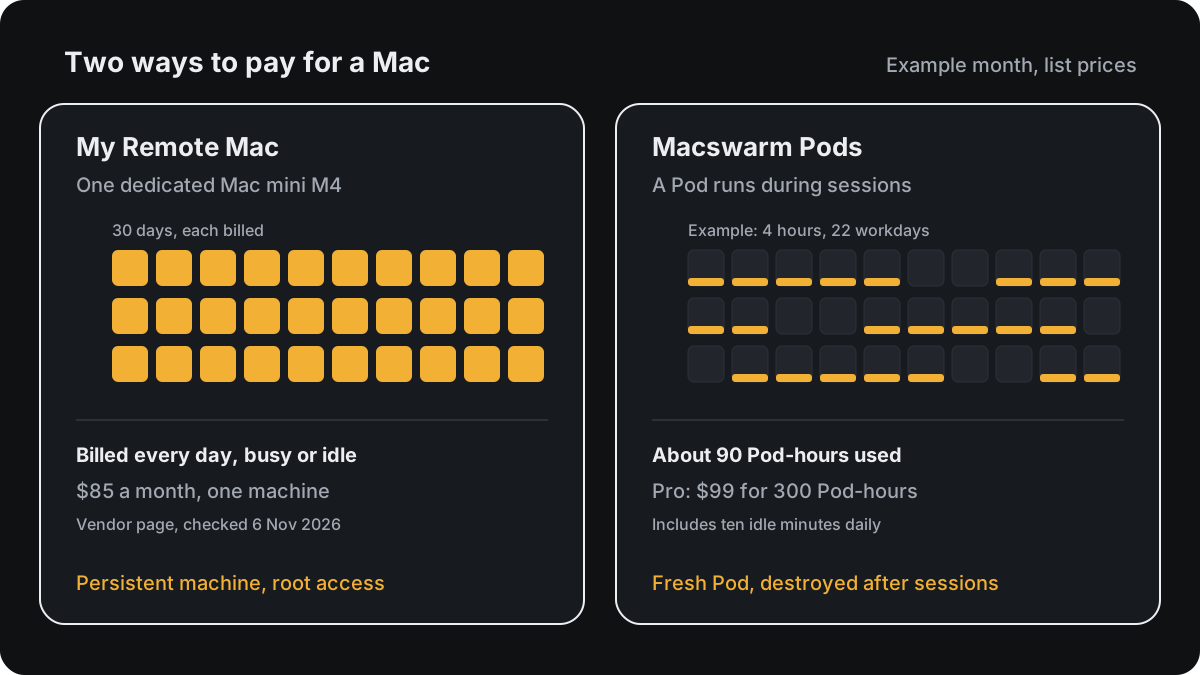
For that one developer, My Remote Mac’s $85 is $14 less than Pro’s $99 (prices checked 6 November 2026). The rented Mac is also on at night and at weekends, so an agent can run around the clock on it at no extra cost, which Pro’s 300 hours would not cover: if back-to-back sessions kept a Pod running all month (each session lasts at most 8 hours), it would use about 720 Pod-hours, which is $99 plus 420 extra hours at $0.40, $267 in all.
The numbers turn with headcount. Three developers using about 90 Pod-hours each use about 270 Pod-hours, still inside one Pro plan at $99, with up to four Pods at a time. Three dedicated Mac mini M4s at My Remote Mac are $255 a month = 3 × $85 (checked 6 November 2026), plus the time to install, update and connect the agents on each one. Five developers working at once need five Pods, which is more than Pro’s four, so they need Team at $399 with ten Pods at a time; five rented Macs are $425 = 5 × $85 at the same checked prices. These are list-price calculations from the pages linked here, not performance benchmarks, and they assume one rented Mac per developer.
Model usage is billed separately by Anthropic or OpenAI on both setups.
Can Claude Code and Codex run on a My Remote Mac?
Yes, if you install them: My Remote Mac gives full root access over SSH and VNC and says you can install any software you need, Homebrew, Docker and custom daemons included. The two pages checked on 6 November 2026 do not document Claude Code or Codex setup, so assume you install the agent, sign it in, keep Xcode and the Simulator runtimes current, and connect the Mac to wherever your sessions start. The home page FAQ says pre-installed Xcode versions are available; which versions, and who updates them, is not stated on the pages checked. That is a reasonable job for one developer who already works over SSH, and the machine and its disk stay yours between sessions. A Macswarm Pod arrives with the Latest Xcode, current and previous iOS runtimes, three to four pre-booted Simulators, Claude Code, Codex and XcodeBuildMCP already installed. Claude Team and Enterprise connect through a Claude self-hosted environment, Claude Pro and Max users sign in to Claude Code inside a Pod, and Codex connects through the OpenAI Agents API webhook.
Inside a Pod, each session works in its own git worktree, builds share two xcodebuild slots, and Simulators are leased to agents in turn, so a standard Pod carries two to three active agents and more can queue. Inside a Pod lists what ships in the image, and Limits and queues has the numbers per Pod and per plan. On a rented Mac, how many agents fit depends on the machine you pick and how you set it up; the vendor publishes the hardware per plan.
How do access and isolation differ?
The two products make opposite choices. My Remote Mac is a machine you administer: root over SSH and VNC, public IPv4 and IPv6 addresses, a disk that keeps your files, caches and credentials for as long as the plan runs, and a physical Mac that no other customer shares. Who handles macOS updates, security maintenance and cleanup is not documented on the two pages checked on 6 November 2026; confirm it with the vendor.
A Macswarm Pod has no SSH, no screen sharing and no inbound ports. It makes outbound connections only, to Anthropic or OpenAI, your git host and package registries. Every session gets a Pod cloned fresh from a golden image, never reused across customers, and destroyed ten minutes after the last session ends; secrets your builds need are injected at session start and are gone with the Pod. On Free, Pro and Team the other Pod on the same Mac mini can belong to another customer, as a separate VM with its own disk and memory; Enterprise customers can have Macs that no other tenant touches. Security describes the model in full.
When My Remote Mac is the better choice
- One person wants one Mac that is on all month, for $85 a month at the entry price (checked 6 November 2026), which is less than Pro’s $99.
- An agent should run around the clock on one machine, with no idle timeout and no metered hours.
- You need root access, SSH or remote desktop, Homebrew services, Docker or custom daemons that a fresh Pod cannot keep.
- You need files, caches and logins to stay on disk between sessions.
- You need a known hardware configuration: My Remote Mac publishes cores, memory and SSD per plan, from the Mac mini M4 to the Mac Pro M2 Ultra; Macswarm does not publish per-Pod figures.
- You need a physical Mac that no other customer shares, without an Enterprise contract.
- You want to debug on a real iPhone; the vendor documents connecting one over the network.
- You need a Mac for a single day: $14 for 24 hours with auto-renew turned off (checked 6 November 2026).
When Macswarm is the better choice
- Claude Code or Codex sessions that build, launch and test an iOS app, with the Latest Xcode, Simulators and the agents already installed and nothing to maintain.
- Several developers sharing one plan: Pro’s 300 Pod-hours cover about three developers at 90 hours each, with up to four Pods at a time.
- Sessions that start in claude.ai, Slack or the Codex app and need a Mac to run on, without anyone driving a desktop.
- A fresh, isolated environment per session, with no credentials left on disk and an EU or US region chosen per environment.
- An agency that keeps one environment per client (Cloud Macs for iOS agencies).
Try a Pod
No card. Connect Claude Code or Codex, and the first Pod boots from the warm pool with Xcode and Simulators ready. Plans and Pod-hour rates are on the pricing page.
Related
- Mac in the cloud pricing: every way to rent a Mac, grouped by billing unit.
- Macswarm vs MacRun: another dedicated Mac mini by the month, or Pod-hours.
- Mac mini vs Macswarm Pods: buying a Mac for agents, or Pod-hours.
- Run Claude Code and Codex on a hosted cloud Mac: the setup and the other ways to give an agent a Mac.
- Quickstart: Claude Code and Quickstart: Codex: connect an agent to a Pod.
Sources
- My Remote Mac plans, prices, hardware, day-plan rules, add-ons and the 1:1 allocation, root access and uptime statements: myremotemac.com/pricing, checked 6 November 2026. Prices in USD, excluding tax.
- My Remote Mac access over SSH and VNC, installable software, pre-installed Xcode versions and iPhone connection: myremotemac.com, checked 6 November 2026.
- Macswarm prices and limits: the pricing page, Inside a Pod, Limits and queues and Security. The monthly figures above are our arithmetic from the list prices.