Mac mini hosting: do you need a hosted Mac at all?
Mac mini hosting is keeping a Mac mini online in a data center: your own Mac in a colocation rack, a dedicated Mac rented by the month, a cloud Mac billed by the minute, or a Macswarm Pod. For Claude Code and Codex sessions that start and stop, a Pod is ready in minutes with the Latest Xcode and both agents installed, from 3 free Pod-hours with no card. For a Mac that must stay on around the clock, with SSH and a persistent disk, host a whole Mac.
Do I need a hosted Mac mini at all?
You need a hosted Mac when work that requires macOS has to run somewhere other than the Mac on your desk. Xcode and the iOS Simulator run only on macOS (FAQ), so a coding agent that builds or tests an iOS app needs a Mac too. There are four ways to get one. Colocation puts a Mac mini you own in a data center rack. A dedicated rental gives you a whole Mac by the month. A per-minute cloud Mac boots a fresh machine for one job. A Macswarm Pod is a macOS virtual machine with the Latest Xcode, pre-booted Simulators, Claude Code and Codex already installed, billed per Pod-hour and destroyed ten minutes after its last session. If your agents work in sessions and several developers would otherwise need a Mac each, use Pods. If the machine must stay on around the clock, with SSH and a disk that persists, host a whole Mac.
Free includes 3 Pod-hours once, with no card. Who this page is not for: a developer who already has a Mac on the desk and runs agents there needs no hosting.
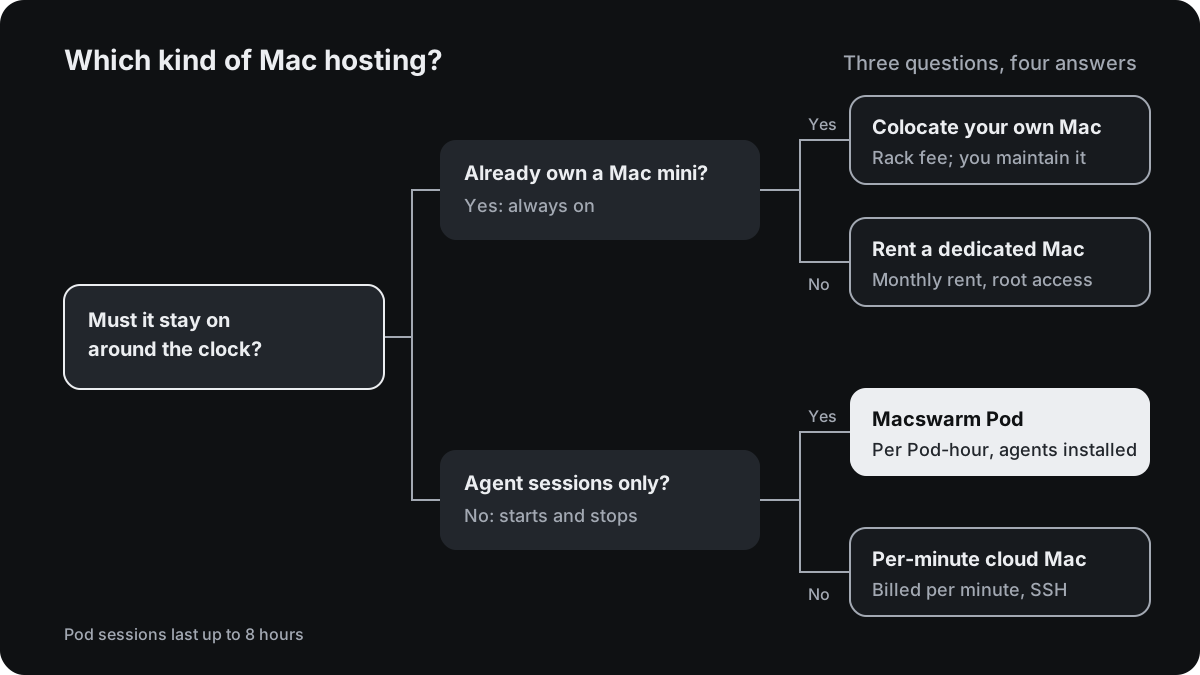
What are the four kinds of Mac hosting?
| Macswarm Pod | Per-minute cloud Mac | Rented dedicated Mac | Colocation of your own Mac | |
|---|---|---|---|---|
| Who owns the hardware | Macswarm; shared Apple silicon on Free, Pro and Team | The provider | The provider | You |
| Example price | Pro $99 a month for 300 Pod-hours, then $0.40 | NoMac $0.90 an hour, billed per minute, from $10 prepaid credit | MacStadium M4 Mac mini, 16 GB, $149 a month; Mac Mini Vault from $54.99 | Mac Mini Vault $59.99 a month; GigeNET $99 plus $100 setup; MacDuty from €30 before VAT |
| Stays on | No: up to 8 hours a session, destroyed 10 minutes after the last | No: deleted when the session stops | Yes | Yes |
| Access | Through the agent’s session; no SSH | Root over MCP, CLI, API or SSH | Root, a dedicated IPv4 address | Whatever you set up: SSH, screen sharing |
| What persists | Nothing on the Pod; commits stay on your git host | A 20 GB encrypted drive between sessions | The whole disk | The whole disk |
| Who installs Xcode and the agents | Macswarm: the Latest Xcode, Claude Code and Codex | Xcode preinstalled; you connect the agent | You, on the macOS the provider installs | You |
| Hardware failure | Macswarm’s problem | The provider’s | The provider’s | Yours: the host power-cycles it, you repair it |
Source, checked 7 November 2026: nomac.app, macstadium.com/pricing, macminivault.com, gigenet.com and macduty.com; Macswarm prices from the pricing page.
The Pod column describes a standard Pod as documented in Inside a Pod: one of two Pods on a shared Mac mini; per-Pod CPU, memory and disk figures are not published. The other columns describe the vendors’ listed machines; the hardware is not comparable row by row.
MacStadium’s colocation address now redirects to its rented bare-metal page, which on 7 November 2026 did not document colocation of a customer’s own Mac. Its listed rentals start at $109 a month for an M2 Mac mini and $149 for an M4 (macstadium.com, checked 7 Nov 2026).
What does colocating your own Mac mini involve?
Colocation fits a Mac mini you already own that should run all day on a data center connection. The fees, checked 7 Nov 2026: Mac Mini Vault charges $59.99 a month for any Mac mini model, with a 1 Gbps port for 2010 and newer models (100 Mbps for older ones), unlimited transfer, one public IPv4 address, remote reboot control and hands-on support in business hours (macminivault.com). GigeNET charges $99 a month per Mac mini in Chicago plus a $100 setup fee, with engineers on site around the clock and a one-year term as standard (gigenet.com). MacDuty charges from €30 a month before VAT, €50 for a Pro chip, in Romania, with power included, no setup fee and no minimum term (macduty.com).
Prepare the Mac before you ship it. MacDuty lists these requirements, and once the Mac is racked only you can reach it:
-
Confirm the host takes your model, and get its address. MacDuty takes Apple silicon, M1 or newer, and not Intel Mac minis. You order with the model and year; it confirms the Mac fits and sends the shipping address together with the IP address your Mac will have. Configure macOS at home with that address before you post it.
-
Start after a power cut, and do not sleep. Without this, a Mac that loses power stays off until someone presses the button. Check the settings with
man pmset, then run:sudo pmset -a autorestart 1 sleep 0 -
Turn on Remote Login. In System Settings, General, Sharing, turn on Remote Login and choose who may log in (Apple Support, checked 7 Nov 2026). Test it from another machine on your network:
ssh you@mac-mini.local -
Decide on FileVault. An encrypted disk stops at a password prompt on every boot, and the host cannot type it. MacDuty asks for FileVault off, or unlocked by you after each restart. Check the state with:
fdesetup status -
Install Xcode and your agents. Install Xcode, then Claude Code or Codex, and keep sessions in
tmuxso a dropped connection does not end them. Updates to macOS, Xcode and the iOS runtimes stay your job. -
Ship the bare Mac mini. Send it without cables or adapters and keep the box. The host mounts and cables it, and power-cycles it on request. MacDuty does not open or repair a customer’s Mac; a dead one is posted back.
The trade: you pay for the hardware once, and the monthly fee covers rack space, power and network. Buying one is priced in Mac mini vs Pods.
When is a whole hosted Mac the better choice?
A colocated or rented Mac is the better choice when:
- It must run around the clock. A daemon, a server or an unattended job that runs for days. A Pod session lasts up to 8 hours, and the Pod is destroyed ten minutes after its last session (Limits and queues).
- You need SSH or screen sharing. Pods make outbound connections only, with no SSH or screen sharing (Security).
- State must persist on the machine. Caches, simulators and build products stay on a hosted Mac’s disk; on a Pod nothing persists between sessions.
- It is a CI runner. A hosted Mac can register as a self-hosted runner. A Pod has no runner registration and no workflow trigger; macOS CI runner prices compares runners.
- You need a known machine configuration. Vendors publish chip, memory and disk per Mac; per-Pod figures are not published.
A per-minute cloud Mac is the better choice for a one-off job that needs SSH or the desktop, with no monthly fee: NoMac lists $0.90 an hour, billed per minute only while the Mac is ready (nomac.app, checked 7 Nov 2026).
What does an agent team actually need?
An agent team needs a Mac for each developer’s sessions while they run, not a Mac per developer around the clock. On a Pod, one developer’s Claude Code and Codex sessions share one macOS virtual machine, each in its own git worktree. A standard Pod runs two to three active agents, builds share two xcodebuild slots, and three to four Simulators are pre-booted (Inside a Pod). Pro runs up to four Pods at a time and Team up to ten.
A worked example, for four developers at list prices, assuming one hosted Mac per developer for the whole Mac options. The pricing page’s example developer uses four hours of Pod runtime a day for 22 days, about 90 Pod-hours a month, so four developers use about 360. Prices checked 7 Nov 2026:
| Option for four developers | Monthly cost | Notes |
|---|---|---|
| Macswarm Pro, 360 Pod-hours | $123 | $99 for 300 Pod-hours plus 60 at $0.40; four Pods at a time |
| NoMac, 360 hours | $324 | $0.90 an hour, per minute, prepaid |
| Mac Mini Vault colocation, four Macs | $239.96 | Plus buying four Mac minis |
| MacStadium, four M4 Mac minis | $596 | $149 each, dedicated and always on |
Source, checked 7 November 2026: nomac.app, macminivault.com, macstadium.com/pricing; Macswarm prices from the pricing page. The totals are our arithmetic.
On these assumptions Pro comes to about $31 per developer a month (our arithmetic on prices checked 7 Nov 2026). The whole Macs buy something the Pod does not: a machine that stays on, with SSH and a persistent disk. If your developers run agents eight hours a day, every day, the Pod-hours grow and the gap narrows; the pricing page has the calculator.
Claude Code reaches a Pod through a Claude self-hosted environment on Team or Enterprise, or by signing in inside the Pod on Pro or Max; Codex uses the OpenAI Agents API webhook. The Claude Code quickstart and the Codex quickstart walk through each.
Which should I choose?
- Agent sessions for one to ten developers: Pods. A Mac is ready in minutes with the Latest Xcode, Claude Code and Codex, with no procurement and no machine to maintain.
- A Mac mini you already own, needed all day: colocation.
- A Mac needed all day for months, without buying one: a dedicated rental.
- A one-off job that needs SSH or the desktop: a per-minute cloud Mac.
- A pool of Macs reserved for one organization, in the EU or the US: Macswarm Enterprise, from $3,000 a month.
Related
- HostMyApple vs Macswarm: VPS or dedicated Mac hosting vs Pod-hours.
- RentAMac vs Macswarm: a dedicated Mac by the day or month, or Pod-hours.
- MacRent vs Macswarm: a Mac by the day/week/month, or Pod-hours.
What else do people ask?
How much does Mac mini colocation cost?
On the providers’ own pages, checked 7 Nov 2026: Mac Mini Vault charges $59.99 a month per Mac mini in US data centers; GigeNET charges $99 a month per Mac mini in Chicago plus a $100 setup fee, with a one-year term standard; MacDuty charges from €30 a month before VAT in Romania, €50 for a Pro chip, with no setup fee and no minimum term. You supply and own the Mac in every case, and you maintain macOS and Xcode yourself.
Is renting a Mac mini cheaper than colocating one?
It depends on the provider and the machine. Mac Mini Vault lists colocation at $59.99 a month and dedicated rentals from $54.99, so its cheapest rental costs less per month than colocating there; MacStadium rents an M4 Mac mini for $149 a month, and MacDuty colocates one from €30 before VAT (checked 7 Nov 2026). Colocation also needs a Mac you have bought. Renting avoids the purchase and the shipping, and the provider replaces failed hardware.
Can I host a Mac mini for CI?
Yes. A colocated or rented Mac mini can be registered as a self-hosted runner for your CI system, and it stays on with a fixed address. A Macswarm Pod is not a CI runner: it has no runner registration and no workflow trigger. Pods are environments for Claude Code and Codex agent sessions that start and stop. For CI prices, see the macOS CI runner comparison.
Do Claude Code and Codex need a hosted Mac?
They need macOS when the task builds or tests an Apple app, because Xcode and the iOS Simulator run only on a Mac. You can install the agents on a hosted Mac and drive them over SSH, or use a Macswarm Pod, where the Latest Xcode, pre-booted Simulators, Claude Code and Codex are already installed and two to three agents share one Pod.
Can I SSH into a Macswarm Pod?
No. Pods make outbound connections only, with no inbound ports, no SSH and no screen sharing. You follow agents through Claude, Codex, the pull request and the logs and screenshots in the dashboard. If you need to log in to the machine, a colocated, rented or per-minute cloud Mac fits better, since each of those gives you a login.